Math Really Counts
How to Use the Live Math Editor
I have made the writing of math questions and answers faster than ever! You can use the live math editor to enter your questions and submit your answers with an automatic on-screen preview. This is a What You See Is What You Get (WYSIWYG) editor. It is based on MathQuill, a popular program for adding math formulas and special symbols to a web page.
Here is a quick demo on how to use it:
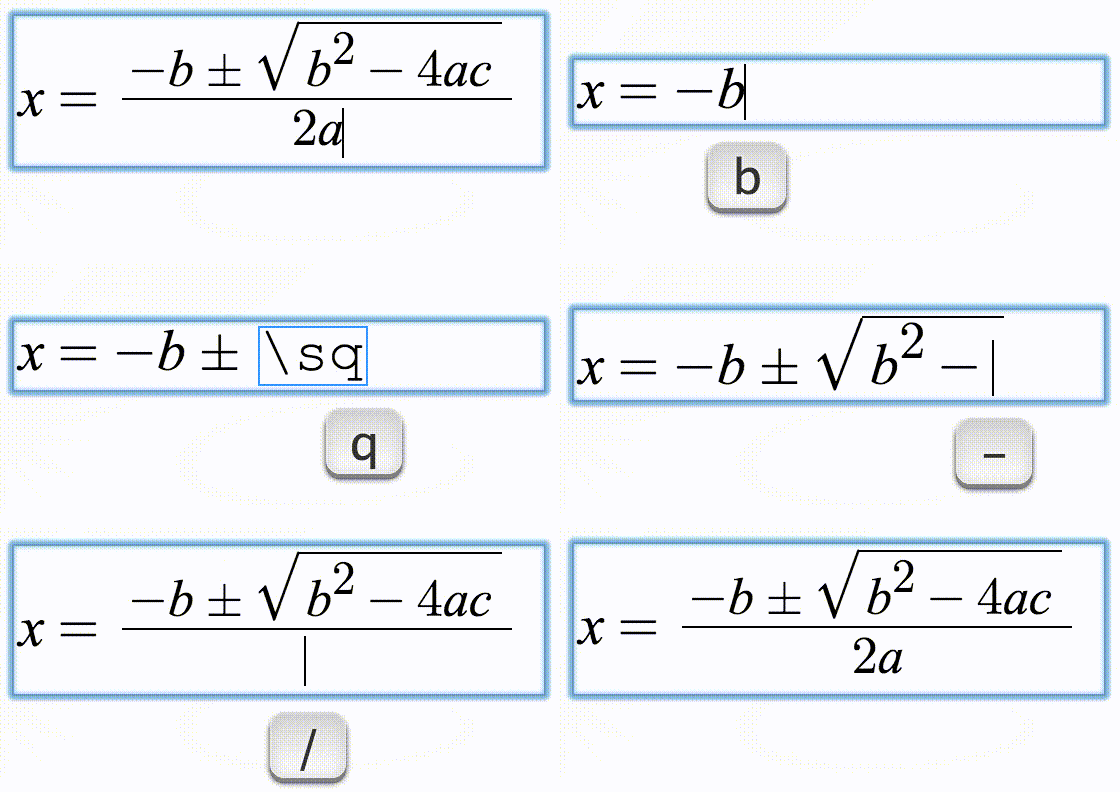
You can use either the live math editor or the math wizard to enter your math.
You can practice typing math here: or use
LaTeX of what you typed: LaTeX code will appear here
Please note: Spaces are ignored when using the live math editor. The Space bar can be used to get out of the current editable field, like an exponent, or to advance the cursor from the numerator to the denominator of a fraction. The Tab key can also be used for that purpose.
Behind the scenes, the math expressions, equations and symbols are rendered into LaTeX, a scripting language for math. Once you have entered the math expressions, equations or symbols, you can copy and paste their LaTeX code to the desired field and save your questions and answers.
In order to allow the dollar sign ($) in the math questions, I have made the LaTeX opening and closing tags with two dollar signs ($ $). So please always use two dollar signs ($$) to tag your math expressions, equations and symbols.
If you're not familar with LaTeX, no worries. Here is a quick guide for the most common syntax.
| Input | Output |
|---|---|
| 7*x or 7 \cdot x | $$ 7\cdot x $$ |
| 3/4 | $$ \frac{3}{4} $$ |
| x^2 | $$ x^2 $$ |
| \sqrt{x} | $$ \sqrt{x} $$ |
\sqrt {x} {x} | $$ \sqrt[n]{x} $$ |
| \pi | $$ \pi $$ |
| \le | $$ \le $$ |
| \ge | $$ \ge $$ |
| \lt | $$ \lt $$ |
| \gt | $$ \gt $$ |
| \ne | $$ \ne $$ |
| \pm | $$ \pm $$ |
| a\equiv b | $$ a\equiv b $$ |
| n^{\circ} | $$ n^{\circ} $$ |
| \infty | $$ \infty $$ |
| \binom{n}{m} | $$ \binom{n}{m} $$ |
| \overline{AB} | $$ \overline{AB} $$ |
| \underline{CD} | $$ \underline{CD} $$ |
| AB \perp CD | $$ AB\perp CD $$ |
| AB \parallel CD | $$ AB \parallel CD $$ |
| \angle EGF \cong \angle JFH | $$ \angle EGF \cong \angle JFH $$ |
| \triangle ABC \sim \triangle CDE | $$ \triangle ABC \sim \triangle CDE $$ |
Restrictions
There are two types of math questions in this application: Multiple Choice and Free Response. While there are no restrictions for using any LaTeX code for Multiple Choice questions and answers and for Free Response questions, there are some restrictions for the answer fields in the Free Response questions. The following special characters are not allowed in the answer fields in the Free Response questions. So please do not enter them in the answer fields when you submit your answers because your answers will not be evaluated.
If you want to create a question and need to use any of the following special characters in your answer, please create the answer as a multiple choice instead of a free response.
| Special Character | Name |
|---|---|
| ∼ | Tilde |
| ` | Backtick (Backquote) |
| ! | Exclamation Mark |
| @ | At Sign |
| # | Pound Sign |
| $ | Dollar Sign |
| % | Percent |
| & | Ampersand |
| _ | Underscore |
| " | Double Quote |
| ' | Single Quote (Apostrophe) |
| : | Colon |
| ; | Semicolon |
| , | Comma |
| ? | Question Mark |
Supported Browsers
Please use one of the following browsers for the math editor. The editor may not work properly in other browsers.
Firefox and Chrome
You're all set. That was easy...
Contact
If you have any questions/comments or encountered any issues, please Contact me.
Thomas Jefferson High School for Science and Technology